
A website can have excellent content and an attractive design, but technical problems can still prevent it from performing well in search results. Technical SEO focuses on the behind-the-scenes elements that help search engines crawl, understand, index, and evaluate a website effectively. It also improves the experience visitors receive when they interact with your pages.
For businesses competing online, technical optimisation is an important part of building a reliable digital presence. Issues such as slow loading pages, broken links, poor mobile performance, incorrect redirects, and indexing problems can affect visibility and user engagement. Fixing these issues creates a stronger foundation for your content and other SEO activities.
Technical SEO is particularly important for growing websites. As businesses add new pages, products, services, blog posts, and functionality, the underlying website structure can become increasingly complicated. Regular checks help identify problems before they negatively affect search performance.
In this guide, we’ll explore ten essential technical improvements that can help create a faster, more accessible, and search-friendly website.
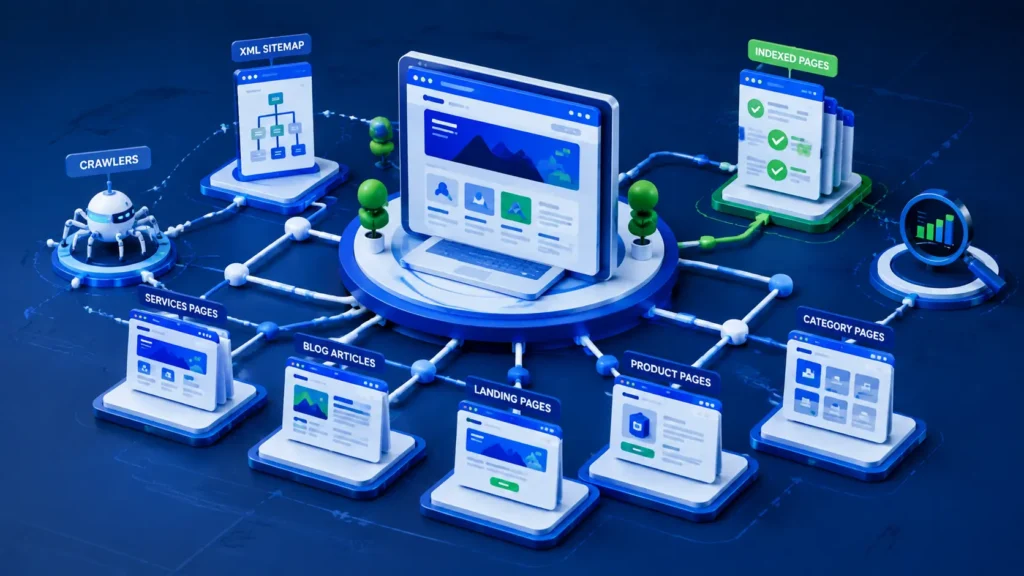
- Make Your Website Easy for Search Engines to Crawl
Search engines use automated crawlers to discover and analyse webpages. If important pages cannot be reached or crawled efficiently, they may struggle to appear in search results.
A logical website structure makes it easier for crawlers to move between pages. Important content should be accessible through internal links rather than being isolated deep within the website.
Review your website for:
- Broken internal links
- Orphan pages
- Incorrect navigation
- Blocked resources
- Unnecessary URL parameters
- Excessively deep page structures
A clear hierarchy also helps visitors understand how different sections of your website relate to one another.
For example, an eCommerce website might organise its structure as:
Homepage → Category → Subcategory → Product
A service-based business could use:
Homepage → Services → Individual Service
This logical structure makes websites easier to navigate while helping search engines understand which pages are most important.
- Improve Page Speed Before Visitors Leave
Website performance directly affects user experience. When a page takes too long to load, visitors may leave before interacting with its content.
Slow performance can result from large images, excessive scripts, inefficient code, poor hosting, and unnecessary plugins or third-party resources.
Common improvements include:
- Compressing images
- Using modern image formats such as WebP
- Reducing unnecessary JavaScript
- Minifying CSS and JavaScript
- Enabling browser caching
- Using efficient hosting
- Removing unnecessary plugins
- Optimising server response times
Page speed should be measured rather than estimated. Tools such as Google PageSpeed Insights and Lighthouse can identify performance opportunities and provide useful technical recommendations.
Improving speed benefits both users and search visibility because visitors can access information more efficiently.
- Strengthen Your Mobile Experience
A significant portion of website activity comes from smartphones and tablets. A website that works well on a desktop but performs poorly on smaller screens can create unnecessary friction for visitors.
Mobile optimisation means more than simply shrinking a desktop layout. Navigation, buttons, forms, images, typography, and page elements should all work comfortably on different screen sizes.
A mobile-friendly website should provide:
- Responsive layouts
- Easy-to-use navigation
- Readable typography
- Touch-friendly buttons
- Properly scaled images
- Fast loading times
- Simple forms
- Consistent functionality across devices
Google also uses mobile-first indexing, making the mobile version of a website particularly important for search visibility.
Testing your website on different smartphones and browsers can reveal usability issues that may not be obvious when viewing it on a desktop computer.
- Check Which Pages Google Can Actually Index
Crawling and indexing are not the same thing.
A search engine may discover a page but decide not to include it in its index. If an important business page is accidentally excluded, it cannot generate organic search traffic.
Indexing problems can occur because of:
- Incorrect noindex directives
- Robots.txt restrictions
- Canonicalisation issues
- Duplicate pages
- Server errors
- Poor internal linking
- Incorrect redirects
Google Search Console can help website owners understand which URLs have been indexed and identify pages that require investigation.
Regularly reviewing indexed pages is especially important for larger websites where technical problems can affect hundreds of URLs.
- Use XML Sitemaps Properly
An XML sitemap provides search engines with a structured list of URLs that you want them to discover and understand.
A sitemap does not guarantee rankings or indexing, but it can help search engines discover important pages, particularly on larger or frequently updated websites.
Your sitemap should generally contain relevant, indexable URLs rather than pages that are blocked, redirected, or intentionally excluded from search.
After creating or updating your sitemap, it can be submitted through Google Search Console so Google can discover it more efficiently.
For large websites, keeping sitemaps organised and regularly updated is an important part of technical maintenance.
- Manage Redirects and Broken URLs
Websites change constantly. Pages are renamed, products are discontinued, services are reorganised, and URLs may change during redesigns.
If old URLs are removed without appropriate redirects, users may encounter broken pages and search engines may lose access to valuable content.
A properly implemented 301 redirect can help send visitors and search engines from an old URL to its relevant replacement.
However, redirects should be used carefully. Sending every old URL to the homepage is rarely a good solution because the destination should be relevant to the original content.
Regularly check for:
- 404 errors
- Redirect chains
- Redirect loops
- Broken internal links
- Outdated URLs
- Incorrect destination pages
Keeping your website’s URL structure clean improves usability and helps preserve SEO value when pages change.
- Create a Clear Internal Linking System
Internal links connect pages within the same website. They help visitors discover related information while providing search engines with additional context about your site’s structure.
A strong internal linking strategy should connect related pages naturally.
For example, a website development agency might connect:
Web Design → Web Development → eCommerce Development → Shopify Development
A blog article can also link to relevant service pages when the connection genuinely helps the reader.
Effective internal linking can:
- Improve navigation
- Help discover new pages
- Distribute authority between pages
- Reinforce topical relationships
- Encourage visitors to explore more content
Avoid adding links simply to increase their number. The best internal links are useful, relevant, and placed naturally within the content.
- Implement Structured Data Where It Makes Sense
Search engines need to understand the meaning and context of your content. Structured data provides additional information about entities and page types in a format search engines can process more easily.
Depending on your website, structured data may be relevant for:
- Organisations
- Local businesses
- Products
- Reviews
- Events
- Articles
- FAQs
- Breadcrumbs
For example, product structured data can provide search engines with information about product details such as price, availability, and other relevant attributes.
Structured data does not guarantee enhanced search results, but accurate implementation can help search engines interpret eligible content more effectively.
It should always reflect information that is actually visible and relevant on the page.
- Fix Duplicate and Similar Content Problems
Large websites can unintentionally create multiple URLs containing substantially similar content.
This is common on eCommerce websites where filters, sorting options, variations, and tracking parameters generate additional URLs.
Duplicate content can make it harder for search engines to determine which version should be prioritised.
Businesses can manage these situations through techniques such as:
- Canonical URLs
- Appropriate redirects
- Consistent internal linking
- Carefully managed URL parameters
- Unique product and category content
For product-based websites, unique descriptions are particularly valuable. Copying manufacturer descriptions across hundreds of products provides little differentiation and makes it harder for your website to demonstrate unique value.
A well-planned content and URL strategy can reduce duplication while making important pages more useful to customers.
- Monitor Core Web Vitals and Overall Website Health
Technical SEO should not stop once your website launches. Websites require continuous monitoring because new content, plugins, integrations, design changes, and development updates can introduce fresh problems.
Core Web Vitals provide important signals relating to loading performance, responsiveness, and visual stability.
Regularly monitor:
- Loading performance
- Interaction responsiveness
- Visual stability
- Mobile usability
- Security issues
- Crawl errors
- Broken links
- Indexing changes
- Server performance
Tools such as Google Search Console and PageSpeed Insights can help identify issues that need attention.
Ongoing monitoring is especially valuable after major website changes. A redesign or new feature may improve one area while unintentionally creating problems somewhere else.

Building Technical SEO Into Your Website Strategy
Technical optimization should not be treated as a separate task that happens only when rankings fall. It should be incorporated into the wider website development and SEO strategy from the beginning.
When developers, designers, and SEO specialists work together, technical decisions can be made with both user experience and search visibility in mind.
This approach can influence:
- Website architecture
- Navigation
- Page templates
- URL structures
- Content management systems
- Mobile layouts
- Performance
- Structured data
- Internal linking
At WebFox Agency, technical website development and SEO can work together to create digital platforms that are designed with performance, usability, and long-term search visibility in mind.
A strong technical foundation allows businesses to build additional content and marketing campaigns without constantly dealing with avoidable structural problems.
When Should You Perform a Technical SEO Audit?
There is no single moment when every business should conduct an audit. However, certain situations make technical reviews particularly valuable.
Consider reviewing your website when:
- Organic traffic suddenly declines
- Search rankings drop unexpectedly
- A website redesign is planned
- You migrate to a new platform
- A new domain is introduced
- Your website has grown significantly
- New technical features are launched
- Google Search Console reports problems
- Pages are not being indexed
- Your website becomes noticeably slower
A technical SEO audit can reveal problems that are difficult to identify through normal website browsing.
The earlier these issues are discovered, the easier they are generally to address.
Making Technical SEO Part of Long-Term Growth
A technically healthy website provides a stronger foundation for every other digital marketing activity. Content marketing, link building, local SEO, and paid campaigns all perform better when visitors arrive on a website that is fast, secure, accessible, and easy to navigate.
Technical SEO is therefore not simply about satisfying search engine requirements. It is about creating a better digital experience for real people.
Businesses that regularly maintain their websites can benefit from:
- More efficient crawling
- Better page accessibility
- Stronger user experience
- Improved website performance
- Fewer technical errors
- Better mobile usability
- A more scalable website structure
As websites become more complex and search technology continues to evolve, maintaining a strong technical foundation becomes increasingly important.
By addressing crawling, indexing, speed, mobile usability, redirects, internal links, structured data, duplicate content, and Core Web Vitals, businesses can create a website that is better prepared for both users and search engines.